
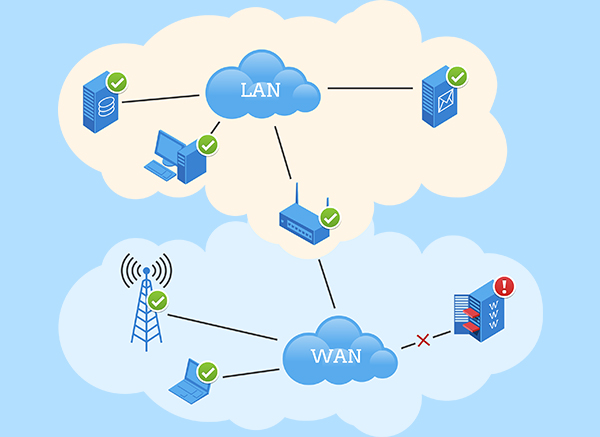
Professional Network & Server Monitoring Tool
IPHost monitors your network resources 24 hours a day and
alerts you to issues.


The software works on Microsoft Windows 7, 8, 10, 11 and Windows Server 2008, 2012, 2016, 2019, 2022


Main Features
Application Templates
Monitors from an application template perform in-depth checks of a particular type of servers and applications. You can easily create and maintain monitors from an application template.
Alerts – Notifications
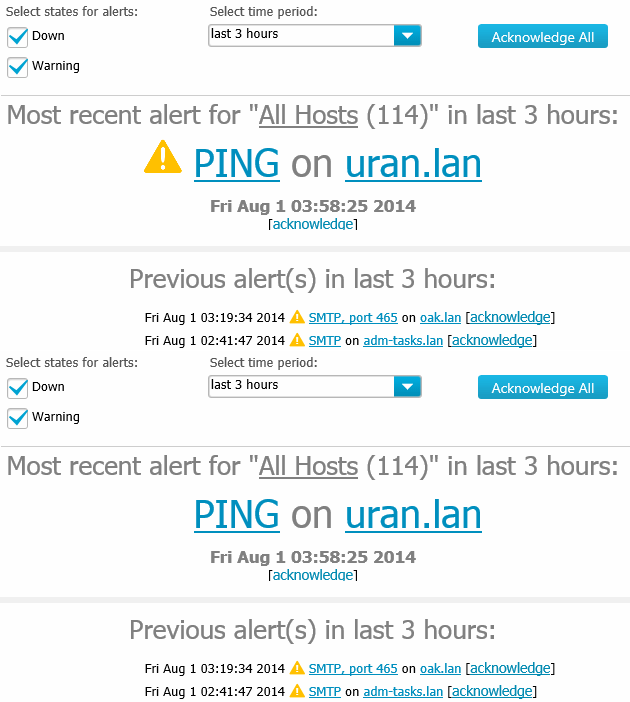
More than 10 alert types for user notification about network resource issues. Program can send email, SMS, push notification or instant message, can play sound. There are a couple of alerts for autorecovery (scripts).
Distributed Monitoring
IPHost Network Monitor can monitor distributed networks. Install Remote network agent in every subnet and you can monitor them using each monitoring method supported.
Quick Start
You can install IPHost Network Monitor in less than 2 minutes. Program is easy to use so you can configure your monitoring system quickly using network discovery and other wizards.
SMS Alert
The most reliable alert (notification method) – just connect phone or GSM modem to computer with IPHost Network Monitor and you will get SMS about issues in your network fast and reliably.
Clear Reporting
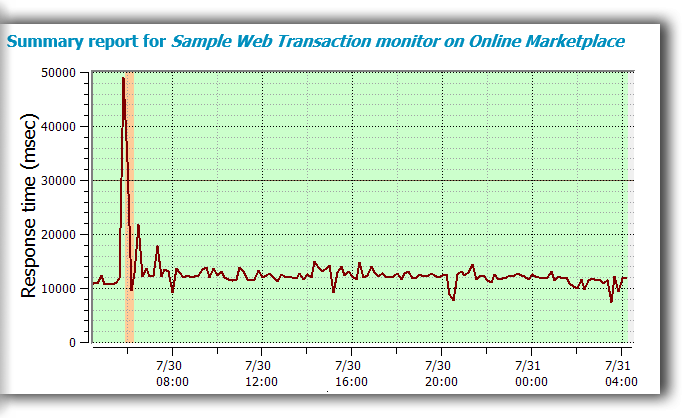
Simple to comprehend visualization of monitoring events. You can see all major monitoring events, trends in monitoring state, for time interval of your choice.
Robust Reliability
IPHost Network Monitor is bulletproof stable and can work for years without ever crashing. It’s a small standalone application and it requires no dedicated server but standard computer (PC) in most cases.
Monitors – Protocols
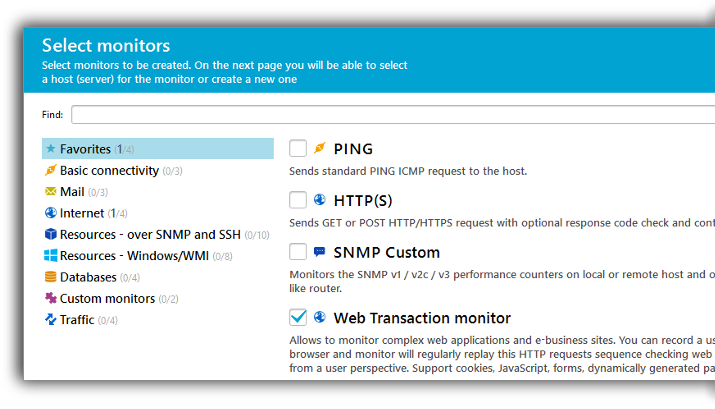
More than 40 supported monitoring methods: starting from PING till SNMP and WMI, including traffic monitoring. Excellent web monitoring abilities: you can check one page with HTTP request or page sequence with Web Transaction monitor.
Web Transaction
Web Transaction Monitor helps you to understand real user experience issues with your web application. It can simulate the whole page sequence required to perform some business operation, for example checkout in online shop.
Proactive
You can create monitoring setup so that you will get notifications on performance and availability levels you need. It lets you to get alerted on issues before they become problems.
Network Discovery
With network discovery wizard you can find network hosts and start monitoring of their resources. Discovery can be scheduled to start on schedule. You can set discovery for each remote network agent.
Web Interface
All primary functions of watching and controlling monitors on easy to use dashboards. Quick and efficient way to view reports, start and stop monitors, and watch alerts.
Download MIB files from our online database of MIBs with description of all OIDs.
News
-
This is a maintenance and bug fixing release. Performance values have been extended from 32-bit integers to 64-bit integers, so that a monitor can now provide a result that exceeds the largest 32-bit number....
-
This is a maintenance and bug fixing release. Fixed a bug in the DB upgrader process (upgrade to the latest versions might fail) Response Timeout values for all monitors can now be entered in milliseconds...
Monitor Types
Ping Monitor, TCP and UDP Port
Simple but effective ways to monitor availability of remote server. With TCP and UDP monitors you can check network service on any port.
Mail Server Monitors
You can check mail servers using IMAP, POP3 or SMTP. All monitors can authenticate, SMTP monitor can actually send a message.
System Parameters Monitors
With Windows service monitor you can check service presence. Available disc space and file size can also be monitored.
Web Server Monitors
A single web page can be monitored using HTTP monitor. You can check content for specific string, authentication and SSL are also supported. FTP/SFTP servers can also be monitored
DataBase Monitors
Native monitors for Oracle, MySQL, MS SQL. Other databases can be monitored using ODBC driver.
SNMP and WMI Monitors
Industry standard monitoring methods for any server/device (SNMP) and for Windows computers (WMI). Traffic monitoring is also supported.
Web Transaction Monitor
Monitoring of web site or application user experience. You can record a multi-step sequence of web pages and monitor will test it regularly.
Custom Script Monitors
Scripts and programs can be run on local computer or remotely using SSH. It allows to create any monitor for any device. You can also use Nagios plugins as scripts.
Customer's Case Studies
“200 automated checks”
Clipit.nl is a media monitoring solution for online, social and print media. We have a lot of legacy applications running in the background to gather and process relevant news messages for our customers. We are using IPHost Monitor since 2010, and found it a very stable solution. We have extended IPHost Monitor with several custom plugins, in order to monitor both server and application health, with more than 200 automated checks. When all monitors are up, we’re really confident about our on quality of service.
Sjaak Janssen, clipit.nl (Netherlands)
“It’s stable”
Total number of 1879 monitors, 710 active. Track every API device, a three building campus. Mostly just track ping for ping for active devices, so disk space, mail servers, HTTP (a couple of web servers), some FTP sites, SNMP traffic speed to specific PCs.
Need to be able to trust. I have 100% trust that it’s telling me the truth. It’s stable. If I do not get emails, I suppose it’s ok. It truly has been a very useful piece for our environment, we have it always live on a huge TV so everybody can see it.
Andrew van Tilburg, innerrange.com (Australia)
“IPhost runs scripts”
I’ve been working in IT support industry since 1994. Used SolarWind in the past. It’s little bit too much what we wanted. After WhatsUp Gold and more recently NetXMS, but it needed frequently restarting. IPhost runs scripts. IPhost is stable. It allows us to react quicker. It’s proactive, rather than active. We run 91 monitor, adding one at a time manually, without ever even using Network Discovery, checking .exe’s running on the servers, a lot of basic checking. Email alerting is the main method, it’s 24/7 even if are home. We carry Android phones to get alerts instantly.
Gary Bradshaw, prepol.com (UK)
Alert Types
Email notification
The most common notification method. You can specify up to two mail servers for email notification delivery.
SMS over Modem or Phone
The most reliable notification method. Connect GSM/CDMA phone or modem and you will get SMS fast and reliably.
Pop-up Message
Pop-up message window in Windows tray. You can enable/disable such messages in one click.
Play Sound
Use this audible notification method when you need to hear that something has happened. You can use any mp3 or WAV file.
SMS over Email
When you on the go and want to get SMS. Depends on your provider’s email2SMS gateway. Select your provider and enter the phone number.
Run Script or Program
Autorecovery or any other type of alert you need. You can run script or program locally or remotely via SSH.
SNMP SET – SNMP variable value
This is another sample of autorecovery alert. For example, sometimes you may need to disable or enable some port on a router.
Messaging – Jabber/ICQ/AOL IM
Use this notification when you need to get it anywhere and on any device you have.
Pricing
IPHost Monitor FAQ
Q: I wish to receive SMS when site is down.
A: We support SMS notifications out of the box. It generally takes approximately 5 minutes to set up Web site (HTTP) monitor with SMS notification. You can choose to receive repeated SMS notifications if site remains in down state. GSM modem can be used to ensure SMS notifications even if there’s no Internet connection. >> Read KB >>
Q: Will I be able to monitor Linux server?
A: Yes, you can monitor servers running Linux and any other operating system reachable by various protocols supported by IPHost (such as SSH, HTTP(S), SMTP and so on). SNMP monitors are recommended to gather information on traffic and system resources. You can arbitrarily expand monitoring possibilities by running a script or program over SSH connection to Linux server. >> Read knowledge base >>
Q: Can I check my Web site availability with your software?
A: Yes, you can perform simple tests for Web page and its content availability, or you can emulate real life interaction with site (sending forms, clicking links and so on). The latter includes interacting with highly dynamic pages, supporting most popular site engines. You can check for presence of certain string; for example — you can check for item availability at Internet shop. >> Read knowledge base >>
Q: Shall I manually enter all the hosts in my network?
A: You haven’t. You can use Network Discovery tool to find all the network devices on your net responding to protocols of your choice. Moreover, you can repeat the discovery process in the future, saving your time by avoiding adding hosts manually. You have fine control over what should be looked for; rediscovery could be used to keep actual inventory of available network devices. >> Read knowledge base >>